
I ran across a very cool Instructable the other day on making pop-up words, and realized this would be a great project for the Cricut. Alas, the fonts listed in the article do not work on the Cricut. You can adapt this to Cricut cutting with any suitable font by adding tabs one by one in Inkscape, SCAL or maybe even CDS, but… I decided it would be quicker to just make a new font.
To prepare your cutfile in SCAL, choose the pop up font in the library window, set the size and start typing. If you are using Solly PopTab font you can insert scoring guides using the minus key. That is what produces the four rows of dashed lines before and after my text below.

Next add rectangles above and below the text with the edges just overlapping. In my example I used the mat centerline on the screen and aligned it with the centerline of the installed letters (the second dash from the bottom) and then made my rectangles end equidistant from the centerline. I haven’t really experimented with the best ways to size everything yet, you will likely develop your own preferred method.


With everything set to weld, your preview and finished cut will look like this.
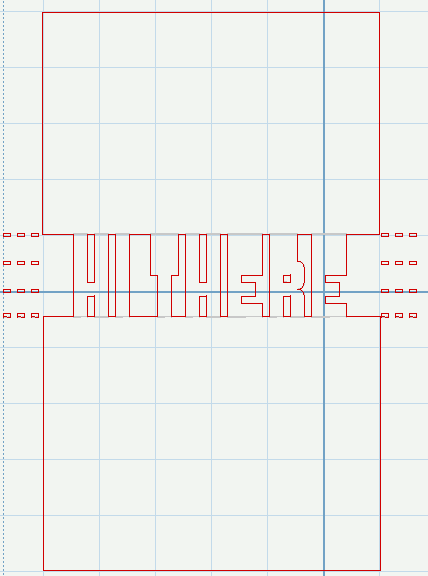
I score the bottom line and top 2 lines before removing the paper from the mat so that I can use the dashed lines as guides.
The instructions for assembly are pretty much the same as what you see on Instructables except that there is nothing on the centerline (2nd set of dashes from the bottom) to fold or score because the Cricut cuts out everything between the letters.
For the time being you’ll have to go to Fontstruct to get my pop up font called Solly PopTab. A registration is required. I think you’ll love Fontstruct anyway, but that’s a subject for another post.

By the way, in this font only uppercase letters, numbers and other characters that have the tab on top will work for the pop-ups. You can also insert artwork, just use the font as a guide for where everything goes.
Enjoy, and let me see your creations when you get done!
Update: Solly PopTab font now available at this link.
Connie’s great tutorial on using this font in Make the Cut


What the HECK??? You are amazing. I L-O-V-E your blog.
Thanks for sharing the font and the tutorial!
Carmen
I can’t wait to try this one, its great.
Thank You, Peggy
This is AWESOME!!!!
Really great! Thanks for your time and effort.
I’m very new to all this. Got a Cricut Exp for Christmas and just got the SCAL, now how do i download this so I can use it on my cricut ? I love the design and want to use it for Valentines Day but not sure how I use this type file with SCAL. Thanks so much in advance for all help !!
To use this in SCAL, install it per the instructions for installing fonts on your computer and it will be available to you when you open SCAL or refresh the font list in SCAL. If you are using SCAL2 for Windows, you can go to the open font dialog and open the font there without installing it.
Thanks for the great font! I have been wanting to make pop-up words forever and this makes it so easy! Thanks for sharing it!
Absolutely awesome! Thanks for another great idea and the instructions to make it work!
Just wanted to say a big Thank You here too for posting the link to my instructions. You were the inspiration!
Amazing! Thank you so much for this and all your files, you are a star!
i dont have a cricut, but i do cut out by hand, and i find it very healing to me.. smiles.. plz help me figure out how to do this so i can cut out by hand.. and i am new to all of this… hugs u..elizabeth
Elizabeth please see the Instructable link in this post. It gives the instructions for doing this by hand.
Hi Kay, can this font be downloaded to our Cameo?
Yes, Shirley, this will work with Silhouette Studio.